Warden integration
What is Warden
Warden is the Naftiko developer portal : a Backstage instance that gives platform and product teams a single place to discover, create, and manage integration capabilities.
Skipper Warden integration in short
Since skipper is the Kubernetes operator that turns Capability CRs into running workloads. When a Capability CR exists in the cluster, Skipper generates and continuously reconciles: ConfigMap, Deployment, Service..
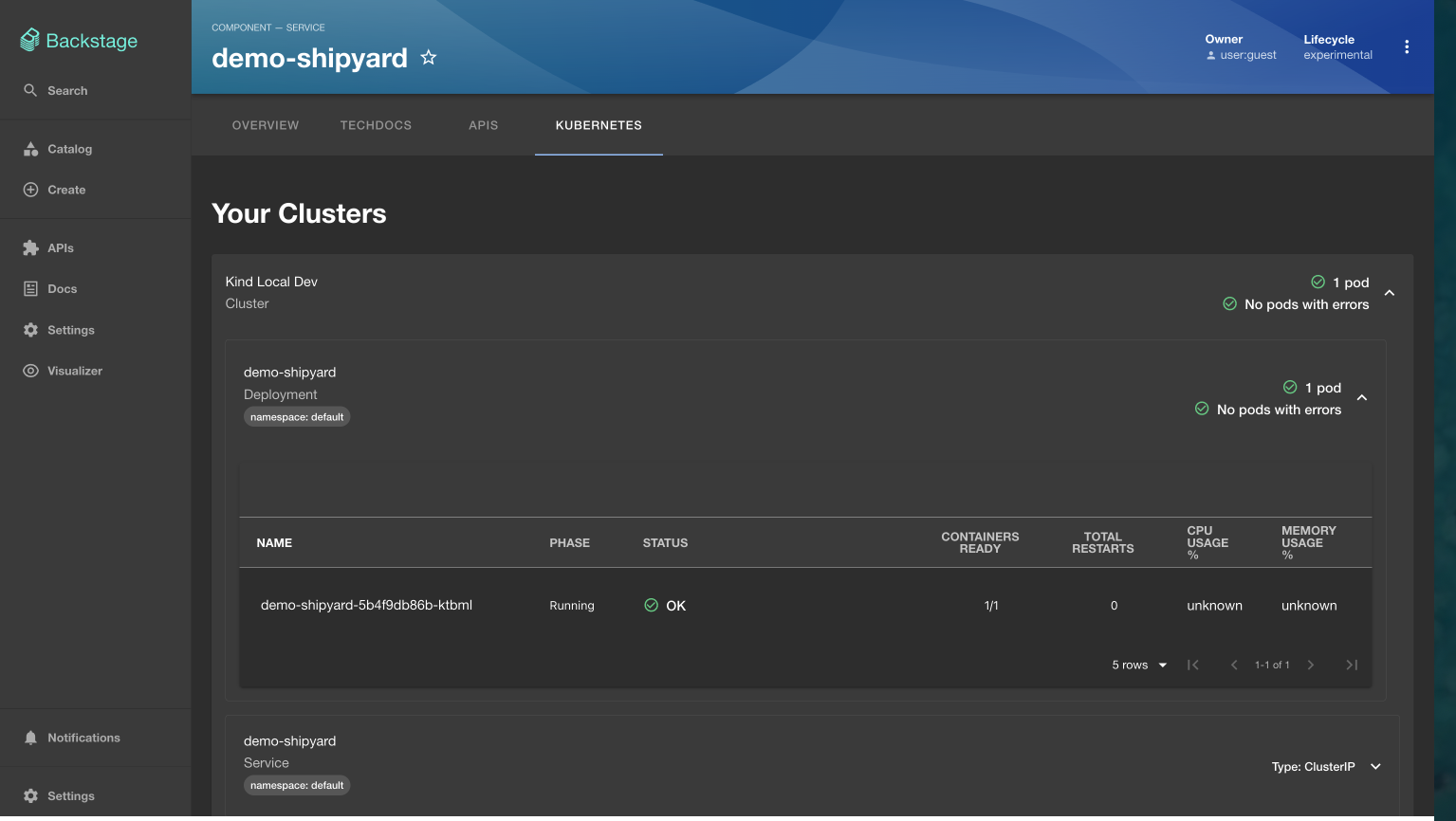
The Skipper Warden integration enables you, when you create a new capability from the Warden template, if your backstage app is configured to enable the kubernetes plugin to understand how capabilities running on the cluster surface in Warden component kubernetes tab.
How it works
scaffolding
The scaffolding template generates a GitHub repo that is created with:
my-capability-repo/
├── my-capability.ikanos.yml     ← main ikanos capability file
├── *-consumes.yml               ← imported ikanos consumes capability files
├── mkdocs.yml                   ← techdocs file
├── README.md
├── backstage                    ← backstage catalog component integration files
│   ├──provided-apis
│   │   └── catalog-info.yaml
│   └── service
│       └── catalog-info.yaml
├── deploy                       ← deployment files
│   ├── configmap.yaml           ← main configmap file
│   ├── *-import-*.yaml          ← import configmap files
│   └── capability.yaml
└── docs                         ← techdocs files
    ├── backstage.md
    ├── deploy.md
    └── index.md
# configmap.yaml — generated by Warden scaffolding
apiVersion: v1
kind: ConfigMap
metadata:
  name: my-capability-spec
  namespace: default
data:
  capability.yaml: |
    # contents of my-capability.ikanos.yml

---
# capability.yaml — generated by Warden scaffolding
apiVersion: naftiko.io/v1alpha3
kind: Capability
metadata:
  name: my-capability
  namespace: default
  labels:
    naftiko.io/tier: standard
spec:
  specRef:
    configMap: my-capability-spec
GitOps : how does the repo connect to ArgoCD?
Naftiko Skipper is designed to work with ArgoCD. The operator manages the capability lifecycle inside Kubernetes — ArgoCD manages what gets deployed from Git.
Your repo is registered directly in the Application.yaml provided in the TechDocs. ArgoCD watches the deploy/ subfolder.
Obviously If the repo is private, create a credentials secret first :
Then apply the ArgoCD application.yaml : ArgoCD will automatically sync thekubectl apply -f - <<'EOF' apiVersion: v1 kind: Secret metadata: name: ${{ values.name }}-repo namespace: argocd labels: argocd.argoproj.io/secret-type: repository type: Opaque stringData: type: git url: https://github.com/YOUR_GITHUB_USERNAME/${{ values.repoName }} username: <YOUR_GITHUB_USERNAME> password: <YOUR_GITHUB_PAT> EOFdeploy/folder and apply all manifestskubectl apply -f - <<'EOF' apiVersion: argoproj.io/v1alpha1 kind: Application metadata: name: cap-${{ values.name }} namespace: argocd labels: app.kubernetes.io/part-of: naftiko naftiko.io/capability: ${{ values.name }} spec: project: default source: repoURL: https://github.com/YOUR_GITHUB_USERNAME/${{ values.repoName }} targetRevision: HEAD path: deploy destination: server: https://kubernetes.default.svc namespace: default syncPolicy: automated: prune: true selfHeal: true syncOptions: - ApplyOutOfSyncOnly=true - CreateNamespace=false EOF
Logic
The Kubernetes plugin matches workloads to Component entities via backstage.io/kubernetes-id. Skipper must inject this label on every Deployment it generates:
- And so finally the Kubernetes tab displays information about your cluster.